How Security Cloud Control and Meraki communicate
Deploy from Security Cloud Control to your Meraki device
Security Cloud Control does not deploy configuration changes directly to a Meraki MX device; deployment is a multistep process.
Configuration changes that you make in Security Cloud Control for a Meraki MX device are staged in Security Cloud Control until you deploy them. When you deploy the configuration changes, Security Cloud Control forwards them to the Meraki dashboard, which implements them on the Meraki MX device. Security Cloud Control manages firewall policies while Meraki dashboard manages the network the policies are applied to. Both operations affect the way the Meraki MX device manages and processes network traffic.
Some customers with older tenants may connect the Meraki MX device to Security Cloud Control through an SDC. If you are one of those customers, you can continue to use this method or you can remove the SDC by onboarding your Meraki MX again or updating the connection credentials. You do not need an SDC to connect Security Cloud Control to Meraki MX.
One difference between Security Cloud Control and the Meraki dashboard is the use of objects. For rules that are created on the Meraki dashboard, Security Cloud Control takes Meraki IP address groups or IP address ranges and turns them into objects that can be attached or associated to rules and the device policy. When you deploy objects that are created in Security Cloud Control to Meraki appliances, the Meraki dashboard translates those objects back into IP address groups or ranges. Objects in Security Cloud Control are unique and versatile because they are compatible with other device platforms. If you have other devices onboarded in Security Cloud Control, you may be able to create a single object for all your devices. For more information about objects associated with Meraki devices, refer to Objects Associated with Meraki Devices.
Summary
The key components involved in the communication between Security Cloud Control and Meraki are:
-
Security Cloud Control: Stages configuration changes and initiates deployment to Meraki environments.
-
Secure Device Connector (SDC) or Cisco Cloud SDC: Securely transfers configuration changes from Security Cloud Control to the Meraki dashboard.
-
Meraki dashboard: Implements changes and pushes them to the Meraki MX device.
-
Meraki MX device: Receives deployed changes and enforces policies in the network.
-
Communication service and API key: The API key is provided to the communication service; Security Cloud Control does not store keys, passwords, or credentials.
This process stages configuration changes in Security Cloud Control, transfers them through SDC or the communication service to the Meraki dashboard, and applies them to Meraki MX devices.
Workflow
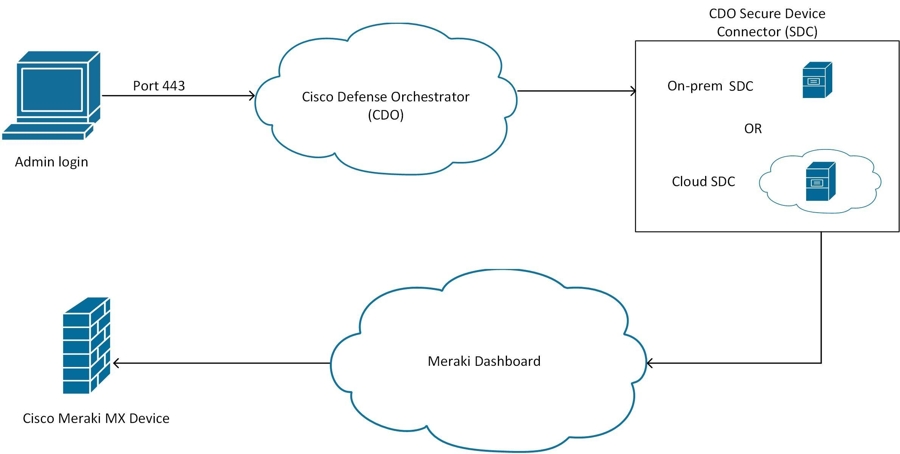
This diagram shows the deployment process.
-
- Prepare and review policy changes in the management interface.
- Keep changes staged until deployment is initiated.
-
Some customers with older tenants may have an existing SDC connection. They can continue to use it or remove the SDC by onboarding the Meraki MX again or updating connection credentials.When... And... Then... And... An SDC is configured for the tenant.
Customers use an SDC or the Cisco Cloud SDC.
Security Cloud Control pushes changes to the SDC.
The SDC securely transfers changes to the Meraki dashboard.
No SDC is used.
The communication service is used for connectivity.
Security Cloud Control forwards changes to the Meraki dashboard.
The dashboard pushes changes to the Meraki MX device.
-
When you deploy the configuration changes, Security Cloud Control forwards them to the Meraki dashboard, which implements them on the Meraki MX device.
- The Meraki dashboard applies the configuration.
- The Meraki MX device enforces the updated policies.
Result
Deployment ensures that Security Cloud Control manages firewall policies while the Meraki dashboard manages the network, and both influence how the Meraki MX device processes network traffic.